Search
Items tagged with: geolocation
Android now stops you sharing your location in photos
https://shkspr.mobi/blog/2026/04/android-now-stops-you-sharing-your-location-in-photos/
My wife and I run OpenBenches. It's a niche little site which lets people share photos of memorial benches and their locations. Most modern phones embed a geolocation within the photo's metadata, so we use that information to put the photos on a map.
Google's Android has now broken that.
On the web, we used to use:
⧉ HTML<input type="file" accept="image/jpeg">
That opened the phone's photo picker and let the use upload a geotagged photo. But a while ago Google deliberately broke that.
Instead, we were encourage to use the file picker:
⧉ HTML<input type="file">
That opened the default file manager. This had the unfortunate side-effect of allowing the user to upload any file, rather than just photos. But it did allow the EXIF metadata through unmolested. Then Google broke that as well.
Using a "Progressive Web App" doesn't work either.
So, can users transfer their photos via Bluetooth or QuickShare? No. That's now broken as well.
You can't even directly share via email without the location being stripped away.
Literally the only way to get a photo with geolocation intact is to plug in a USB cable, copy the photo to your computer, and then upload it via a desktop web browser?
Why?!?!?
Because Google run an anticompetitive monopoly on their dominant mobile operating system.
Privacy.
There's a worry that users don't know they're taking photos with geolocation enabled. If you post a cute picture of your kid / jewellery / pint then there's a risk that a ne’er-do-well could find your exact location.
Most social media services are sensible and strip the location automatically. If you try to send a geotagged photo to Facebook / Mastodon / BlueSky / WhatsApp / etc, they default to not showing the location. You can add it in manually if you want, but anyone downloading your photo won't see the geotag.
And, you know, I get it. Google doesn't want the headline "Stalkers found me, kidnapped my baby, and stole my wedding ring - how a little known Android feature puts you in danger!"
But it is just so tiresome that Google never consults their community. There was no advance notice of this change that I could find. Just a bunch of frustrated users in my inbox blaming me for breaking something.
I don't know what the answer is. Perhaps a pop up saying "This website wants to see the location of your photos. Yes / No / Always / Never"? People get tired of constant prompts and the wording will never be clear enough for most users.
It looks like the only option available will be to develop a native Android app (and an iOS one?!) with all the cost, effort, and admin that entails. Android apps have a special permission for accessing geolocation in images.
If anyone has a working way to let Android web-browsers access the full geolocation EXIF metadata of photos uploaded on the web, please drop a comment in the box.
In the meantime, please leave a +1 on this HTML Spec comment.
#android #geolocation #geotagging #google #OpenBenches

Android now stops you sharing your location in photos
https://shkspr.mobi/blog/2026/04/android-now-stops-you-sharing-your-location-in-photos/
My wife and I run OpenBenches. It's a niche little site which lets people share photos of memorial benches and their locations. Most modern phones embed a geolocation within the photo's metadata, so we use that information to put the photos on a map.Google's Android has now broken that.
On the web, we used to use:
⧉ HTML<input type="file" accept="image/jpeg">That opened the phone's photo picker and let the use upload a geotagged photo. But a while ago Google deliberately broke that.
Instead, we were encourage to use the file picker:
⧉ HTML<input type="file">That opened the default file manager. This had the unfortunate side-effect of allowing the user to upload any file, rather than just photos. But it did allow the EXIF metadata through unmolested. Then Google broke that as well.
Using a "Progressive Web App" doesn't work either.
So, can users transfer their photos via Bluetooth or QuickShare? No. That's now broken as well.
You can't even directly share via email without the location being stripped away.
Literally the only way to get a photo with geolocation intact is to plug in a USB cable, copy the photo to your computer, and then upload it via a desktop web browser?
Why?!?!?
Because Google run an anticompetitive monopoly on their dominant mobile operating system.Privacy.
There's a worry that users don't know they're taking photos with geolocation enabled. If you post a cute picture of your kid / jewellery / pint then there's a risk that a ne’er-do-well could find your exact location.
Most social media services are sensible and strip the location automatically. If you try to send a geotagged photo to Facebook / Mastodon / BlueSky / WhatsApp / etc, they default to not showing the location. You can add it in manually if you want, but anyone downloading your photo won't see the geotag.
And, you know, I get it. Google doesn't want the headline "Stalkers found me, kidnapped my baby, and stole my wedding ring - how a little known Android feature puts you in danger!"
But it is just so tiresome that Google never consults their community. There was no advance notice of this change that I could find. Just a bunch of frustrated users in my inbox blaming me for breaking something.
I don't know what the answer is. Perhaps a pop up saying "This website wants to see the location of your photos. Yes / No / Always / Never"? People get tired of constant prompts and the wording will never be clear enough for most users.
It looks like the only option available will be to develop a native Android app (and an iOS one?!) with all the cost, effort, and admin that entails. Android apps have a special permission for accessing geolocation in images.
If anyone has a working way to let Android web-browsers access the full geolocation EXIF metadata of photos uploaded on the web, please drop a comment in the box.
In the meantime, please leave a +1 on this HTML Spec comment.
#android #geolocation #geotagging #google #OpenBenchesA way to remove EXIF data on `` before sending to server
What problem are you trying to solve? I would like to strip EXIF data from file attachments before they ever reach a server. It would be nice the either the or something in the ...KonnorRogers (GitHub)

#Friendica also allows you to add a #geolocation to a post (but not to a comment).
Rebuilding FourSquare for ActivityPub using OpenStreetMap
https://shkspr.mobi/blog/2024/01/rebuilding-foursquare-for-activitypub-using-openstreetmap/
I used to like the original FourSquare. The "mayor" stuff was a bit silly, and my friends never left that many reviews, but I loved being able to signal to my friends "I am at this cool museum" or "We're at this pub if you want to meet" or "Spending the day at the park".
So, is there a way to recreate that early Web 2.0 experience with open data and ActivityPub? Let's find out!
This quest is divided into two parts.
- Get nearby "Points of Interest" (POI) from OpenStreetMap.
- Share a location on the Fediverse.
OpenStreetMap API
OpenStreetMap is the Wikipedia of maps. It is a freely available resource which anyone can edit (if they're skilled enough).
It also comes with a pretty decent API for querying things. For example, nw["amenity"]({{bbox}}); finds all "amenities" near a specific location.
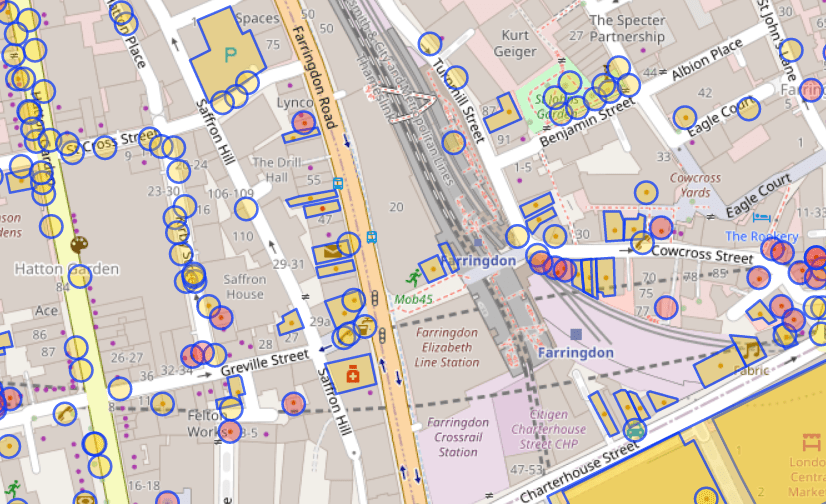
As you can see, it has highlighted some useful areas - a pharmacy and a pub. But it has ignored other useful locations - the train station and the park. It has also included some things that we may not want - bike parking and a taxi rank.
What API call is needed to get useful locations of of OverPass?
It's possible to specify the type of thing to find using nw["amenity"="restaurant"]; - but adding every single type of thing would quickly end up with a very large query containing hundreds of types.
It is also possible to exclude specific types of places. This retrieves all amenities except for fast food joints:
nw["amenity"]({{bbox}});-nw["amenity"="fast_food"]({{bbox}});Again, that would be complex.
Perhaps one solution is just to return everything and let the user decide if they want to check in to a telephone kiosk or a fire hydrant? That's a bit user-hostile.
Instead, this query returns everything which has a name nw["name"]({{bbox}});
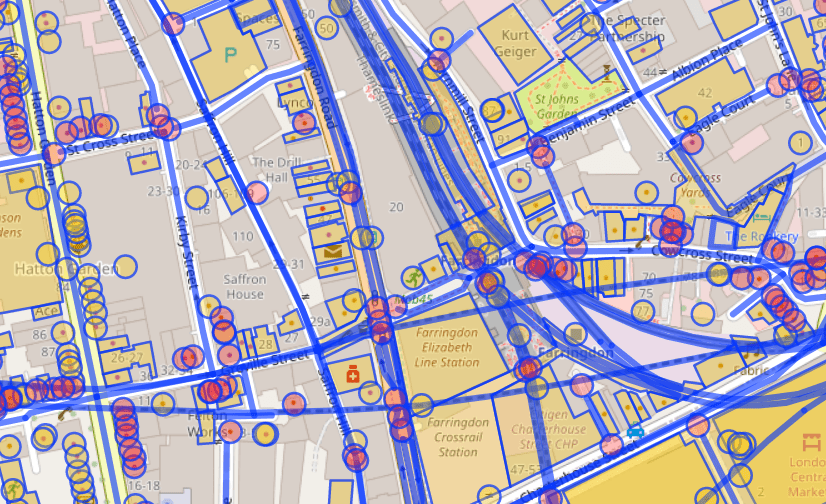
That cuts out any unnamed things - like park benches and car-sharing spots. But it does add named roads and train lines.
It is possible to use filters to exclude results from OverPass. The best that I can come up with is: nw["name"][!"highway"][!"railway"][!"waterway"][!"power"]({{bbox}});
That gets everything which has a name, but isn't a highway or railway or waterway or powerline. It isn't perfect - but it will do!
This is the query which will retrieve the 25 nearest things within 100 metres of a specific latitude and longitude. It includes the name and any other tags, the location, and the OSM ID.
ActivityPub
There's good news and bad news here. Firstly, ActivityStreams (which are subscribed to in ActivityPub) supports the concept of "Place" and "Location".
Once the user has a latitude and longitude, the can share it - along with a message, photo, or anything else.
Something like:
{ "@context": "https://www.w3.org/ns/activitystreams", "type": "Note", "content": "Here in NYC! <a href=\"https://www.openstreetmap.org/way/958999496\">John Lennon's Imagine Mosaic</a>.", "attachment": [ { "type": "Image", "mediaType": "image\/jpeg", "url": "https:\/\/fastly.4sqi.net\/img\/general\/590x786\/56367_9pxuZJD7d1hgPdaMFcFq1pipvTTMynBJsYcpHH-b8mU.jpg", "name": "A photo of a mosaic which says 'Imagine'." } ], "location": { "name": "John Lennon's Imagine", "type": "Place", "longitude": 40.77563, "latitude": -73.97474 }}For example, here's a PixelFed post with an attached location - and this is the JSON representation. That status can be reposted into other social networks.
It is worth noting that Mastodon doesn't (natively) support location - if you view my repost of that PixelFed post you'll see there's no location metadata attached. That's OK! It just means that the status needs to include human-readable data.
Similarly, Mastodon doesn't support the arrive vocabulary. So this will be limited to a message with a location attached.
Other ActivityPub services do support location.
Putting it all together
Well… that's a job for next week. Probably!
- Building a web site which gets the user's location is easy.
- Getting the data from OverPass should be straightforward.
- Creating an ActivityPub server which can post geotagged notes into the Fediverse might be a little beyond my skillset! Some testing with Darius Kazemi's AP Glitch suggests this should work.
If you'd like to help, please leave a comment.
https://shkspr.mobi/blog/2024/01/rebuilding-foursquare-for-activitypub-using-openstreetmap/
#ActivityPub #fediverse #FOURSQUARE #geolocation #OpenStreetMap
Rebuilding FourSquare for ActivityPub using OpenStreetMap
https://shkspr.mobi/blog/2024/01/rebuilding-foursquare-for-activitypub-using-openstreetmap/I used to like the original FourSquare. The "mayor" stuff was a bit silly, and my friends never left that many reviews, but I loved being able to signal to my friends "I am at this cool museum" or "We're at this pub if you want to meet" or "Spending the day at the park".
So, is there a way to recreate that early Web 2.0 experience with open data and ActivityPub? Let's find out!
This quest is divided into two parts.
- Get nearby "Points of Interest" (POI) from OpenStreetMap.
- Share a location on the Fediverse.
OpenStreetMap API
OpenStreetMap is the Wikipedia of maps. It is a freely available resource which anyone can edit (if they're skilled enough).It also comes with a pretty decent API for querying things. For example,
nw["amenity"]({{bbox}});finds all "amenities" near a specific location.
As you can see, it has highlighted some useful areas - a pharmacy and a pub. But it has ignored other useful locations - the train station and the park. It has also included some things that we may not want - bike parking and a taxi rank.
What API call is needed to get useful locations of of OverPass?
It's possible to specify the type of thing to find using
nw["amenity"="restaurant"];- but adding every single type of thing would quickly end up with a very large query containing hundreds of types.It is also possible to exclude specific types of places. This retrieves all amenities except for fast food joints:
nw["amenity"]({{bbox}});-nw["amenity"="fast_food"]({{bbox}});
Again, that would be complex.Perhaps one solution is just to return everything and let the user decide if they want to check in to a telephone kiosk or a fire hydrant? That's a bit user-hostile.
Instead, this query returns everything which has a name
nw["name"]({{bbox}});
That cuts out any unnamed things - like park benches and car-sharing spots. But it does add named roads and train lines.
It is possible to use filters to exclude results from OverPass. The best that I can come up with is:
nw["name"][!"highway"][!"railway"][!"waterway"][!"power"]({{bbox}});That gets everything which has a name, but isn't a highway or railway or waterway or powerline. It isn't perfect - but it will do!
This is the query which will retrieve the 25 nearest things within 100 metres of a specific latitude and longitude. It includes the name and any other tags, the location, and the OSM ID.
ActivityPub
There's good news and bad news here. Firstly, ActivityStreams (which are subscribed to in ActivityPub) supports the concept of "Place" and "Location".Once the user has a latitude and longitude, the can share it - along with a message, photo, or anything else.
Something like:
{ "@context": "https://www.w3.org/ns/activitystreams", "type": "Note", "content": "Here in NYC! <a href=\"https://www.openstreetmap.org/way/958999496\">John Lennon's Imagine Mosaic</a>.", "attachment": [ { "type": "Image", "mediaType": "image\/jpeg", "url": "https:\/\/fastly.4sqi.net\/img\/general\/590x786\/56367_9pxuZJD7d1hgPdaMFcFq1pipvTTMynBJsYcpHH-b8mU.jpg", "name": "A photo of a mosaic which says 'Imagine'." } ], "location": { "name": "John Lennon's Imagine", "type": "Place", "longitude": 40.77563, "latitude": -73.97474 }}
For example, here's a PixelFed post with an attached location - and this is the JSON representation. That status can be reposted into other social networks.It is worth noting that Mastodon doesn't (natively) support location - if you view my repost of that PixelFed post you'll see there's no location metadata attached. That's OK! It just means that the status needs to include human-readable data.
Similarly, Mastodon doesn't support the
arrivevocabulary. So this will be limited to a message with a location attached.Other ActivityPub services do support location.
Putting it all together
Well… that's a job for next week. Probably!
- Building a web site which gets the user's location is easy.
- Getting the data from OverPass should be straightforward.
- Creating an ActivityPub server which can post geotagged notes into the Fediverse might be a little beyond my skillset! Some testing with Darius Kazemi's AP Glitch suggests this should work.
If you'd like to help, please leave a comment.
https://shkspr.mobi/blog/2024/01/rebuilding-foursquare-for-activitypub-using-openstreetmap/
#ActivityPub #fediverse #FOURSQUARE #geolocation #OpenStreetMap
05 - Find nodes by applying multiple filters
A basic tutorial covering the key features of the Overpass languageosm-queries.ldodds.com
I'd like to be able to set a latitude & longitude in such a way that people can discover something in a specific #geolocation.
Anyone know if that's possible - either with the #MastodonAPI or other tool?