Search
Items tagged with: JustLinuxThings
Using the RK Royal Kludge keyboard configuration webapp on Linux PC
Okay today I managed to accidentally trigger “locked” function keys on my rather new M70 RK Royal Kludge. There is a modifier hotkey for this that I didn’t know of before (FN + LEFT CTRL) and I was lost for a hot minute how to turn it off again. Ah well, we’re still getting to know each other.
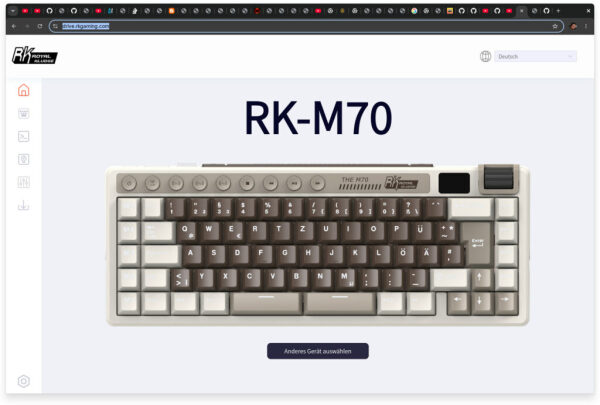
Anyway, I know from a previous attempt that RKGaming offers a webapp to configure the keyboard (especially it’s macro keys) on https://drive.rkgaming.com/. This works to this date only in Google Chrome (Webserial in Firefox is coming though). Here we can click a button and connect to the wireless receiver and… nothing. Ah yes, we’re on Linux PC and random browsers shall not write to our hardware devices. This is in principle a good idea and I did encounter this before with my Viture XR glasses so I had an idea where to start poking.
First things first: Confirming my theory I checked the browser console and sure enough it was not allowed to open the device:
[HID] Selected device: 2.4G Wireless Receiver vid=0x3554 pid=0xfa09
index-JWjn01Gh.js:1 NotAllowedError: Failed to open the device.
There is also this special
chrome://device-log/ address in Chrome that has some more details:HIDEvent[12:08:56] Failed to open '/dev/hidraw10': FILE_ERROR_ACCESS_DENIED
HIDEvent[12:08:56] Access denied opening device read-write, trying read-only.With this information we do have the Vendor ID (
0x3554) the Product ID (0xfa09) and the subsystem (hidraw) in question. This is btw the dmesg output for the connected device, confirming what we know already:new full-speed USB device number 17 using xhci_hcd
New USB device found, idVendor=3554, idProduct=fa09, bcdDevice= 1.02
New USB device strings: Mfr=1, Product=2, SerialNumber=0
Product: 2.4G Wireless Receiver
Manufacturer: CXAnd a quick check on
/dev/hidraw10 confirms that we simply to not have permission to read or write to this hidraw device, since it belongs to root.crw-rw----. 1 root root 241, 9 8. Jun 12:05 /dev/hidraw10Now a quick and dirty fix for the current session would be to simply change the ownership of that device but I really want this to stick around after the next reboot so I created the
udev rule file /usr/lib/udev/rules.d/72-rk-royal-kludge.rules:# Udev processes rules in alphabetical/numerical order. The actual
# application of the uaccess tag happens in systemd's built-in
# 73-seat-late.rules so make sure this is run *before* by saving
# this as e.g. 72-rk-royal-kludge.rules
# uaccess tag means that logind assigns the permissions to users
# dynamically via ACLs according to which session is currently active
SUBSYSTEM=="usb", ACTION=="add", ATTRS{idVendor}=="3554", ATTRS{idProduct}=="fa09", MODE="0660", TAG+="uaccess"
SUBSYSTEM=="hidraw", KERNEL=="hidraw*", ATTRS{idVendor}=="3554", ATTRS{idProduct}=="fa09", MODE="0660", TAG+="uaccess"Changes in such files have to be reloaded with e.g.
udevadm control --reload. After that… nothing happens. This is because the device exists already so it’s time to unplug that receiver briefly. Now udev kicks in and creates the device files with the new rules applied. There is now a slight difference:crw-rw----+ 1 root root 241, 10 8. Jun 12:34 /dev/hidraw10The “+” indicates additional
ACL rules. If you did not know about ACLs before: Oh boy, you’re in for a ride. Anyway, I confirmed that I now have access to this by checking the ACLs with e.g. getfacl /dev/hidraw10# file: dev/hidraw10
# owner: root
# group: root
user::rw-
user:beko:rw-
group::rw-
mask::rw-
other::---And presto. My user
beko has read-write access. Another visit to https://drive.rkgaming.com/ yields a far better result:[HID] Selected device: 2.4G Wireless Receiver vid=0x3554 pid=0xfa09
index-JWjn01Gh.js:2388 Device [2.4G Wireless Receiver] is openNow I can configure my keyboard on Linux PC via a gorram web application like any other cool kid in 2026. I say this because the app will probably have a half-life of 2 years and stop working soon enough again.
What a time to be alive.
#Linux #JustLinuxThings #udev #keyboard #RoyalKludge
This content is licensed under a Creative Commons Attribution 4.0 International license.

https://beko.famkos.net/2026/06/08/using-the-rk-royal-kludge-keyboard-configuration-webapp-on-linux-pc/#JustLinuxThings #keyboard #linux #RoyalKludge #udev

Using the RK Royal Kludge keyboard configuration webapp on Linux PCOkay today I managed to accidentally trigger “locked” function keys on my rather new M70 RK Royal Kludge. There is a modifier hotkey for this that I didn’t know of before (
FN+LEFT CTRL) and I was lost for a hot minute how to turn it off again. Ah well, we’re still getting to know each other.Anyway, I know from a previous attempt that RKGaming offers a webapp to configure the keyboard (especially it’s macro keys) on https://drive.rkgaming.com/. This works to this date only in Google Chrome (Webserial in Firefox is coming though). Here we can click a button and connect to the wireless receiver and… nothing. Ah yes, we’re on Linux PC and random browsers shall not write to our hardware devices. This is in principle a good idea and I did encounter this before with my Viture XR glasses so I had an idea where to start poking.
First things first: Confirming my theory I checked the browser console and sure enough it was not allowed to open the device:
[HID] Selected device: 2.4G Wireless Receiver vid=0x3554 pid=0xfa09
index-JWjn01Gh.js:1 NotAllowedError: Failed to open the device.
There is also this specialchrome://device-log/address in Chrome that has some more details:HIDEvent[12:08:56] Failed to open '/dev/hidraw10': FILE_ERROR_ACCESS_DENIED HIDEvent[12:08:56] Access denied opening device read-write, trying read-only.
With this information we do have the Vendor ID (0x3554) the Product ID (0xfa09) and the subsystem (hidraw) in question. This is btw thedmesgoutput for the connected device, confirming what we know already:new full-speed USB device number 17 using xhci_hcd New USB device found, idVendor=3554, idProduct=fa09, bcdDevice= 1.02 New USB device strings: Mfr=1, Product=2, SerialNumber=0 Product: 2.4G Wireless Receiver Manufacturer: CX
And a quick check on/dev/hidraw10confirms that we simply to not have permission to read or write to this hidraw device, since it belongs to root.crw-rw----. 1 root root 241, 9 8. Jun 12:05 /dev/hidraw10
Now a quick and dirty fix for the current session would be to simply change the ownership of that device but I really want this to stick around after the next reboot so I created theudevrule file/usr/lib/udev/rules.d/72-rk-royal-kludge.rules:# Udev processes rules in alphabetical/numerical order. The actual # application of the uaccess tag happens in systemd's built-in # 73-seat-late.rules so make sure this is run *before* by saving # this as e.g. 72-rk-royal-kludge.rules # uaccess tag means that logind assigns the permissions to users # dynamically via ACLs according to which session is currently active SUBSYSTEM=="usb", ACTION=="add", ATTRS{idVendor}=="3554", ATTRS{idProduct}=="fa09", MODE="0660", TAG+="uaccess" SUBSYSTEM=="hidraw", KERNEL=="hidraw*", ATTRS{idVendor}=="3554", ATTRS{idProduct}=="fa09", MODE="0660", TAG+="uaccess"
Changes in such files have to be reloaded with e.g.udevadm control --reload. After that… nothing happens. This is because the device exists already so it’s time to unplug that receiver briefly. Nowudevkicks in and creates the device files with the new rules applied. There is now a slight difference:crw-rw----+ 1 root root 241, 10 8. Jun 12:34 /dev/hidraw10
The “+” indicates additionalACLrules. If you did not know about ACLs before: Oh boy, you’re in for a ride. Anyway, I confirmed that I now have access to this by checking the ACLs with e.g.getfacl /dev/hidraw10# file: dev/hidraw10 # owner: root # group: root user::rw- user:beko:rw- group::rw- mask::rw- other::---
And presto. My userbekohas read-write access. Another visit to https://drive.rkgaming.com/ yields a far better result:[HID] Selected device: 2.4G Wireless Receiver vid=0x3554 pid=0xfa09 index-JWjn01Gh.js:2388 Device [2.4G Wireless Receiver] is open
Now I can configure my keyboard on Linux PC via a gorram web application like any other cool kid in 2026. I say this because the app will probably have a half-life of 2 years and stop working soon enough again.What a time to be alive.
#Linux #JustLinuxThings #udev #keyboard #RoyalKludge
This content is licensed under a Creative Commons Attribution 4.0 International license.https://beko.famkos.net/2026/06/08/using-the-rk-royal-kludge-keyboard-configuration-webapp-on-linux-pc/#JustLinuxThings #keyboard #linux #RoyalKludge #udev