🚨 #Google is collecting phone numbers /SIM from your phone by default now without asking for consent, here is how to disable it
I have a test phone with stock Android (and hence Google services) to test how the apps I develop behave there etc.
The other day I woke up with a notification in that phone, out of the blue Google was telling me they "verified my phone number" basically they stole/collected my phone number from my phone and sent it to their servers without any consent.
I know the trust bar is very low, but even then I didn't expect Google to do this.
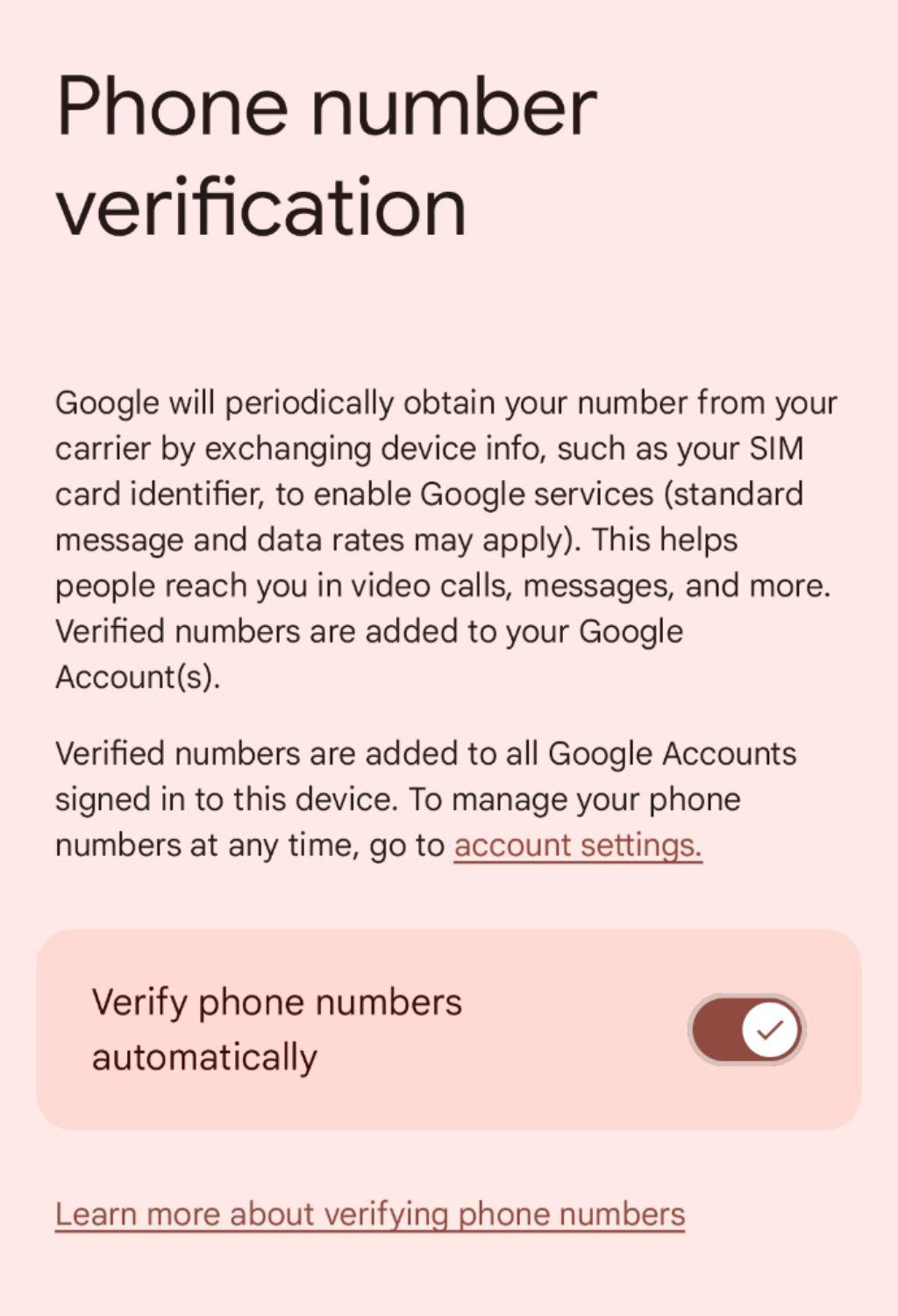
Here is how you can disable the collecting of your phone numbers which is on by default:
Go to Settings -> Google -> All services -> Privacy & security -> Phone number verification. See attached screenshot.
Or even better: switch to #GrapheneOS #LineageOS or other #degoogled systems
Please boost and spread with your not-so-techie friends that might be using stock Google phones
EDIT: corrected typo: it is "all services" not "all devices"
#boost #boost4reach #security #privacy #android